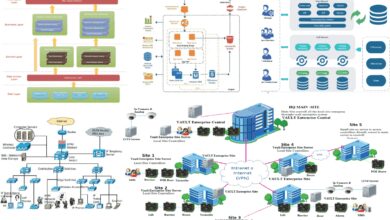
Ever wondered what’s really happening under the hood of your servers and networks? A solid system monitor can reveal all—performance hiccups, security threats, and hidden inefficiencies—all in real time.



What Is a System Monitor and Why It Matters

A system monitor is a software tool or suite designed to track, analyze, and report on the performance and health of computer systems, networks, and applications. From CPU usage to memory leaks, a reliable system monitor provides real-time visibility into the operational status of IT environments, enabling administrators to detect issues before they escalate.
Core Functions of a System Monitor
At its heart, a system monitor performs several critical tasks that keep IT infrastructure running smoothly. These include tracking resource utilization, logging system events, generating alerts, and visualizing performance trends over time.
- Real-time tracking of CPU, RAM, disk, and network usage
- Automated alerting when thresholds are breached
- Historical data logging for trend analysis and capacity planning
Types of System Monitoring
Not all monitoring is created equal. Depending on the environment and goals, organizations deploy different types of system monitoring:
- Infrastructure Monitoring: Focuses on hardware and OS-level metrics like server uptime and disk I/O.
- Application Performance Monitoring (APM): Tracks software behavior, response times, and error rates.
- Network Monitoring: Observes traffic flow, latency, and bandwidth consumption across network devices.
“Monitoring is not about collecting data—it’s about turning data into insight.” — Unknown DevOps Engineer
Key Benefits of Using a System Monitor
Implementing a robust system monitor isn’t just a nice-to-have; it’s a strategic necessity for modern IT operations. The advantages span from preventing downtime to improving user experience and reducing operational costs.
Prevent Downtime and Outages
One of the most significant benefits of a system monitor is its ability to predict and prevent system failures. By continuously analyzing performance metrics, it can detect anomalies such as rising memory usage or unusual network traffic patterns that may signal an impending crash.
For example, if a database server’s disk space drops below 10%, the system monitor can trigger an alert, allowing admins to act before the service halts. According to Gartner, unplanned downtime costs enterprises an average of $5,600 per minute—making proactive monitoring a financial imperative.
Improve Security Posture
System monitors play a crucial role in cybersecurity. They can detect suspicious activities such as unauthorized access attempts, unexpected process executions, or abnormal outbound traffic—often early signs of a breach.
Tools like OSSEC integrate system monitoring with intrusion detection, providing real-time alerts when malicious behavior is detected. This integration allows teams to respond faster and mitigate threats before they escalate.
Optimize Resource Utilization
Many organizations over-provision resources “just in case,” leading to wasted spending. A system monitor provides accurate data on actual usage, enabling smarter decisions about scaling up or down.
For instance, cloud environments like AWS or Azure charge based on usage. With a system monitor tracking CPU and memory trends, you can identify underutilized instances and downsize them, potentially saving thousands annually.
Top 7 System Monitor Tools in 2024
Choosing the right system monitor can make or break your IT operations. Below are seven of the most powerful and widely used tools available today, each with unique strengths for different use cases.
1. Nagios XI
Nagios XI is one of the most established names in system monitoring. Known for its flexibility and extensive plugin ecosystem, it supports monitoring of servers, applications, services, and network protocols.
- Highly customizable dashboards and reporting
- Supports both agent-based and agentless monitoring
- Integrates with DevOps tools like Ansible and Docker
Nagios is ideal for enterprises needing deep control over their monitoring workflows. Learn more at nagios.com.
2. Zabbix
Zabbix is an open-source system monitor that offers real-time monitoring of networks, servers, virtual machines, and cloud services. It’s known for its scalability and built-in alerting engine.
- Auto-discovery of network devices
- Advanced graphing and visualization tools
- Supports distributed monitoring across multiple locations
Zabbix is particularly popular among mid-sized businesses due to its balance of power and cost-effectiveness. Visit zabbix.com for downloads and documentation.
3. Datadog
Datadog is a cloud-based system monitor designed for dynamic, distributed environments. It excels in monitoring microservices, containers, and serverless architectures.
- Real-time dashboards with AI-powered anomaly detection
- Seamless integration with AWS, Kubernetes, and Terraform
- Log management and APM in a single platform
Datadog’s strength lies in its unified observability approach. It’s perfect for DevOps teams managing complex cloud-native applications. Explore it at datadoghq.com.
4. Prometheus
Prometheus is an open-source monitoring and alerting toolkit originally built at SoundCloud. It’s now a CNCF (Cloud Native Computing Foundation) project and widely adopted in Kubernetes environments.
- Pull-based monitoring model with time-series database
- Powerful query language (PromQL) for deep analysis
- Highly scalable and container-friendly
Prometheus is best suited for teams with strong technical expertise who need granular control over metrics. Check it out at prometheus.io.
5. SolarWinds Server & Application Monitor (SAM)
SolarWinds SAM is a comprehensive system monitor that combines infrastructure and application performance monitoring in one package.
- Pre-built templates for common applications (SQL, Exchange, etc.)
- Deep-dive diagnostics for root cause analysis
- User-friendly interface with drag-and-drop dashboards
SAM is ideal for IT teams managing hybrid environments with both on-premises and cloud systems. More info at solarwinds.com.
6. PRTG Network Monitor
PRTG is a Windows-based system monitor that uses sensors to track everything from bandwidth usage to HTTP response times.
- Auto-discovery of network devices
- Over 200 sensor types for diverse monitoring needs
- Mobile app for on-the-go monitoring
PRTG is praised for its ease of setup and intuitive interface. It’s a great fit for small to medium businesses. Learn more at paessler.com.
7. New Relic
New Relic offers a full-stack observability platform that includes system monitoring, APM, infrastructure monitoring, and frontend monitoring.
- Real-time insights with AI-driven recommendations
- Support for distributed tracing and serverless functions
- Free tier available for small-scale use
New Relic is excellent for developers and SREs who want deep visibility into application performance. Visit newrelic.com to get started.
How to Choose the Right System Monitor for Your Needs
Selecting the best system monitor depends on several factors, including your infrastructure size, technical expertise, budget, and specific monitoring goals.
Assess Your Infrastructure Complexity
Are you managing a handful of servers or a global cloud network? Simple environments may benefit from lightweight tools like PRTG or Zabbix, while complex, distributed systems might require enterprise-grade solutions like Datadog or New Relic.
For example, a startup using Kubernetes on Google Cloud would gain more value from Prometheus or Datadog than from a basic SNMP-based tool.
Evaluate Integration Capabilities
The best system monitor should integrate seamlessly with your existing tech stack. Look for compatibility with:
- Cloud platforms (AWS, Azure, GCP)
- Container orchestration (Kubernetes, Docker Swarm)
- CI/CD pipelines (Jenkins, GitLab CI)
- Incident management tools (PagerDuty, Slack, Opsgenie)
Tools like Datadog and New Relic offer hundreds of pre-built integrations, reducing setup time and complexity.
Consider Scalability and Total Cost
Some tools charge per host, per metric, or per data volume. Open-source options like Zabbix and Prometheus are free but may require more in-house expertise and infrastructure to scale.
For instance, Datadog’s pricing can escalate quickly with high metric ingestion, so it’s crucial to model costs based on your expected data volume. Always calculate the total cost of ownership, including staffing, training, and infrastructure.
Best Practices for Effective System Monitoring
Deploying a system monitor is just the beginning. To get the most value, follow these industry-proven best practices.
Define Clear Monitoring Objectives
Start by identifying what you need to monitor and why. Are you focused on uptime, performance, security, or compliance? Clear objectives help you prioritize which metrics to track and how to configure alerts.
For example, an e-commerce site during Black Friday might prioritize transaction latency and error rates over CPU usage.
Set Smart Alert Thresholds
Too many alerts lead to “alert fatigue,” where critical warnings are ignored. Use dynamic thresholds based on historical baselines rather than static values.
For instance, instead of alerting when CPU exceeds 80%, set a threshold that triggers only when usage is 3 standard deviations above the norm for that time of day.
Use Dashboards to Visualize Key Metrics
A well-designed dashboard turns raw data into actionable insights. Focus on displaying KPIs like system uptime, response time, error rates, and resource utilization.
Tools like Grafana (often used with Prometheus) allow you to create customizable, real-time dashboards that can be shared across teams.
Common Challenges in System Monitoring and How to Overcome Them
Even with the best tools, organizations face hurdles in implementing effective monitoring strategies.
Data Overload and Noise
Modern systems generate terabytes of logs and metrics daily. Without proper filtering, this data becomes noise rather than insight.
Solution: Implement log aggregation and filtering. Use tools like Elasticsearch or Fluentd to parse and categorize logs. Focus on collecting only high-value metrics and discard redundant data.
Lack of Standardization
Inconsistent naming conventions, metric formats, or monitoring policies across teams can make it hard to correlate data.
Solution: Establish a centralized monitoring policy. Use configuration management tools like Puppet or Ansible to enforce consistent monitoring setups across all systems.
Skill Gaps and Training Needs
Advanced tools like Prometheus or Datadog require specialized knowledge. Without trained staff, their full potential remains untapped.
Solution: Invest in training and certification programs. Encourage team members to earn credentials like the Prometheus Certified Associate or Datadog University courses.
Future Trends in System Monitoring
The field of system monitoring is evolving rapidly, driven by advances in AI, cloud computing, and distributed systems.
AI-Powered Anomaly Detection
Traditional threshold-based alerts are being replaced by machine learning models that learn normal behavior and flag deviations automatically.
For example, Google’s Cloud Operations suite uses AI to detect performance anomalies without manual configuration. This reduces false positives and speeds up incident response.
Shift-Left Monitoring
Monitoring is moving earlier into the development lifecycle. DevOps teams now embed monitoring into CI/CD pipelines, allowing issues to be caught before deployment.
Tools like OpenTelemetry enable developers to instrument code with monitoring hooks from day one, promoting a culture of observability.
Edge and IoT Monitoring
As more devices operate at the network edge, system monitoring must extend beyond data centers. IoT devices, retail kiosks, and industrial sensors all require lightweight, efficient monitoring solutions.
Projects like Eclipse Kura provide embedded monitoring for edge devices, ensuring reliability even in low-bandwidth environments.
Implementing a System Monitor: Step-by-Step Guide
Ready to deploy a system monitor? Follow this structured approach to ensure success.
Step 1: Inventory Your Systems
Begin by documenting all hardware, software, and network components. Include servers, databases, firewalls, applications, and cloud instances.
Use network scanning tools like Nmap or built-in discovery features in Zabbix or PRTG to automate this process.
Step 2: Identify Critical Metrics
Not everything needs monitoring. Focus on metrics that impact business operations:
- Server uptime and reboot frequency
- CPU, memory, and disk usage
- Application response time and error rates
- Network latency and packet loss
Step 3: Choose and Install Your Tool
Based on your assessment, select a system monitor that fits your needs. Install the server component and deploy agents (if required) on target systems.
For cloud environments, use agentless monitoring via APIs or cloud-native tools like AWS CloudWatch.
Step 4: Configure Alerts and Notifications
Set up alerts for critical events and route them to the right teams via email, SMS, or chat apps like Slack. Use escalation policies to ensure issues don’t go unnoticed.
Test alerting with simulated failures to verify delivery and response times.
Step 5: Monitor, Analyze, and Optimize
Once live, continuously review performance data. Look for trends, bottlenecks, and opportunities for optimization.
Regularly refine your monitoring strategy—add new metrics, retire obsolete ones, and update dashboards to reflect changing business needs.
What is a system monitor used for?
A system monitor is used to track the performance, availability, and health of IT systems. It helps detect issues like high CPU usage, low disk space, or network outages, enabling proactive maintenance and minimizing downtime.
Which system monitor is best for small businesses?
For small businesses, PRTG Network Monitor and Zabbix are excellent choices due to their ease of use, affordability, and strong feature sets. Both offer free versions with sufficient capabilities for smaller environments.
Can a system monitor improve security?
Yes. A system monitor can detect unusual behavior such as unexpected process launches, abnormal login attempts, or spikes in outbound traffic—often early indicators of a cyberattack. When integrated with SIEM tools, it enhances overall security visibility.
Is open-source system monitoring reliable?
Yes, open-source tools like Zabbix, Prometheus, and Nagios are highly reliable and widely used by enterprises. They offer transparency, customization, and strong community support, though they may require more technical expertise to manage.
How does AI enhance system monitoring?
AI enhances system monitoring by analyzing historical data to establish baselines and automatically detect anomalies. This reduces false alerts, accelerates root cause analysis, and enables predictive maintenance—shifting from reactive to proactive operations.
Choosing and implementing the right system monitor is a game-changer for any IT organization. From preventing costly outages to boosting security and efficiency, these tools provide the visibility needed to thrive in today’s complex digital landscape. Whether you’re a small startup or a global enterprise, investing in a robust system monitor isn’t optional—it’s essential. By following best practices, staying ahead of trends, and selecting the right tool for your needs, you can transform raw data into actionable intelligence and keep your systems running at peak performance.
Recommended for you 👇
Further Reading: